
Download Official Form IT112C (PDF)
Opens the official government PDF in a new tab
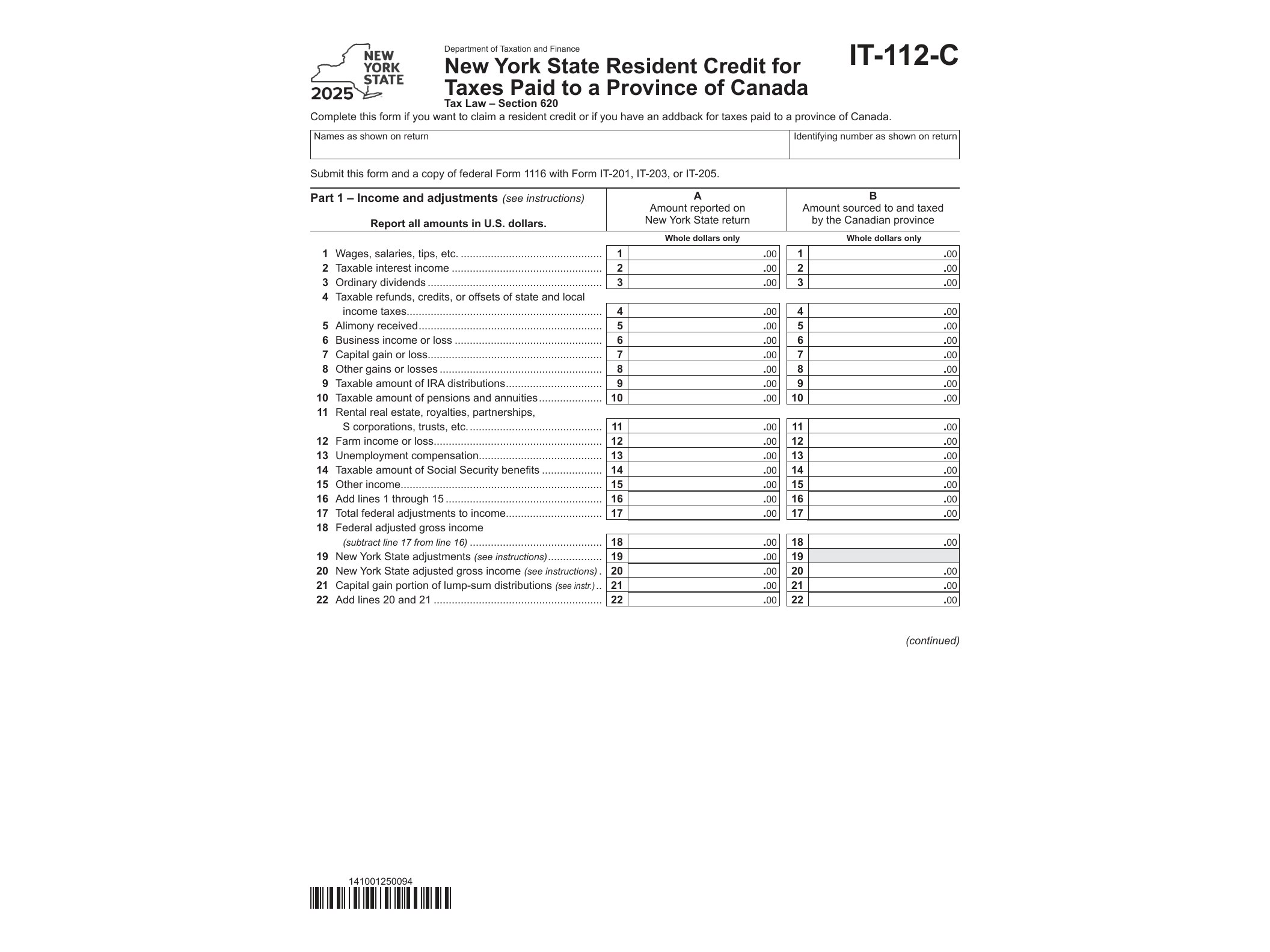
If you’re a New York State resident who earned income taxed by a Canadian province, you could end up paying tax on that same income twice—once to Canada and once to New York. Form IT-112-C exists specifically to prevent that. It lets full-year and part-year New York residents claim a credit against their state tax liability for income tax already paid to a province like Ontario, Quebec, or British Columbia.
This form is issued by the New York State Department of Taxation and Finance and applies to Tax Year 2025 filings. It’s a supplemental form, meaning it doesn’t replace your regular New York income tax return (Form IT-201 or IT-203)—it works alongside it to calculate the exact credit amount you’re entitled to claim.
Who Needs Form IT-112-C
You’ll need this form if all of the following apply to your situation:
- You were a New York State resident (or part-year resident) for the tax year
- You earned income that was also subject to tax by a Canadian province or territory
- You paid provincial income tax on that income and can document it
- You’re filing a New York personal income tax return for the same period
This commonly affects cross-border workers, people with investment income sourced in Canada, retirees receiving Canadian pension income, or New Yorkers who worked temporarily in a Canadian province during the tax year. It’s worth noting that this credit covers provincial tax only—federal Canadian tax paid to the Canada Revenue Agency is handled through a separate credit mechanism (Form IT-112-R covers taxes paid to another state, and different rules apply to federal Canadian tax).
When You Should File This Form
Form IT-112-C gets filed alongside your annual New York State income tax return, typically due in mid-April, matching the standard state filing deadline. You can’t submit it on its own; it attaches to your IT-201 or IT-203 as supporting documentation for the credit you’re claiming on your main return.
If you’re also dealing with multi-state or multi-jurisdiction tax situations, you might find it useful to compare how other states handle similar credit and withholding situations. For example, taxpayers navigating nonresident allocation issues elsewhere sometimes reference Form 587’s nonresident withholding worksheet for California, which follows a comparable logic of allocating income across jurisdictions, even though the specific rules differ.
How to Fill Out and Submit the Form
Form IT-112-C is a fillable PDF (AcroForm), so you can complete it digitally on your computer before printing or attaching it to your e-filed return. You’ll need to gather your Canadian provincial tax documents first—specifically the amount of provincial tax paid and the portion of income that generated that tax.
The form walks through a calculation that compares the New York tax attributable to the Canadian-sourced income against the actual provincial tax paid. The credit is generally limited to the smaller of these two figures, so you won’t end up with a credit larger than what New York would have taxed on that same income anyway.
Key sections to complete include:
- Identifying information matching your New York return
- The province where tax was paid and the tax year involved
- Income amounts subject to both provincial and New York tax
- The provincial tax paid, converted to U.S. dollars
- The final credit calculation, which then transfers to your main NY return
Keep copies of your Canadian tax slips or provincial notices of assessment in case the Department of Taxation and Finance requests verification later. Errors in currency conversion or income sourcing are common reasons this credit gets adjusted or delayed, so double-check your math against the exchange rate used for the relevant tax year.
If you’re managing several state-specific compliance forms at once, it helps to keep a simple checklist by deadline and jurisdiction, similar to how businesses track filings like Form MT-38 for New York liquor and beverage manufacturers or wage-related agreements such as the FTB 1052A PC wage garnishment agreement in California. Cross-border and multi-jurisdiction tax paperwork tends to pile up quickly, and staying organized prevents missed credits or duplicate payments.
Once completed, attach Form IT-112-C to your New York State return when you file, whether electronically or by mail, and retain your supporting documentation for at least three years in case of an audit or review.
Download Official Form IT112C (PDF)
Opens the official government PDF in a new tab